
Design Furniture in 3D with TimberTinker - Woodworking Planner
Sketch on your phone, get shop-ready plans with cut lists, cost estimates, and assembly instructions. Your first 3 projects are free.
See TimberTinker in action


What TimberTinker does
20+ Pre-Built Templates
Parametric templates for cabinets, bookshelves, tables, drawer boxes, and workbenches
Smart Sheet Nesting
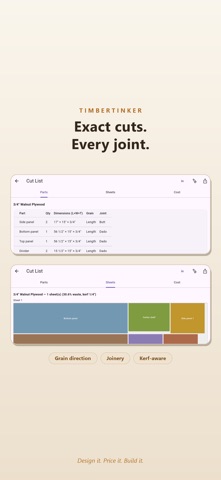
Automatic sheet nesting optimizer with minimal waste and grain direction tracking
Joinery & Assembly Planning
Assign joinery per part and get step-by-step assembly sequences
AI Plan Generator
AI plan generator - describe your piece and get a draft plan
Frequently asked questions
What can TimberTinker do?
TimberTinker lets you design furniture in 3D, assign joinery, and generate cut lists and cost estimates before you start building. Your first 3 projects are free.
What templates does TimberTinker have?
TimberTinker includes over 20 parametric templates for cabinets, bookshelves, tables, drawer boxes, and workbenches. You can also start from scratch or use the AI plan generator to draft designs from plain descriptions.
What lumber sizes does TimberTinker support?
TimberTinker supports real lumber sizes from 2x4s to 3/4" plywood, along with sheet goods. You can also work in millimeters. The app automatically calculates board feet and sheet costs.
What wood species does TimberTinker offer?
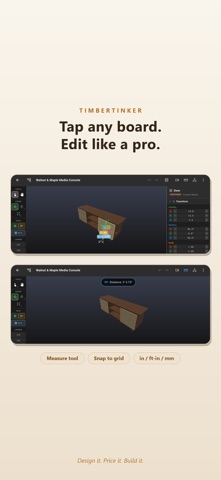
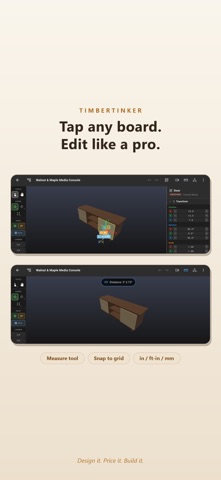
TimberTinker includes 5 wood species: walnut, maple, oak, cherry, and pine. Each wood is rendered with its own tone and texture. You can tap any board to edit its exact size, position, and wood species.
What joinery does TimberTinker support?
TimberTinker allows you to assign joinery per part including dados, rabbets, mortise & tenon, pocket screws, and dowels. It automatically generates a step-by-step assembly sequence for every plan.
How does TimberTinker optimize cut lists?
TimberTinker provides a cut list grouped by material with grain direction and joint for every part. The automatic sheet nesting optimizer shows how to break down plywood with minimal waste.
How do I export my TimberTinker plan?
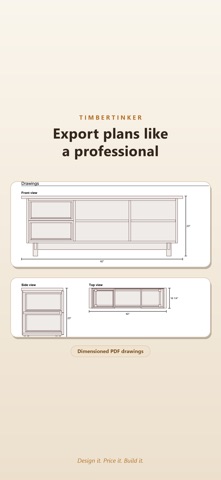
TimberTinker exports clean PDF plans including dimensions, cut list, hardware, and build steps. You can also describe a piece in plain words and let the AI plan generator draft the plan for you.
How much does TimberTinker cost?
TimberTinker has a free tier with 3 projects included. Go Premium for unlimited projects and access to all features.
What languages does TimberTinker support?
TimberTinker is available in English and Spanish. The app works on mobile devices so you can sketch in the garage and have shop-ready plans before you touch a saw.
What design tools does TimberTinker include?
TimberTinker features snap-to-grid, camera presets, a measure tool, and an exploded view that pulls the whole build apart. You can also use the measure tool to take dimensions directly in the app.
Try TimberTinker for yourself.
Want more like this? Leave your email and I'll send the good stuff only.